What you receive

See exactly what each tier unlocks.

Pricing tells you which layer to choose. This page shows what arrives after checkout: terminal access, Paper Bot Lab, API credentials, and the Tier 3 live-control workspace.

Each section is organized around the product views a subscriber receives. The promise stays simple: the higher the tier, the more control you unlock.

Tier tour

The paid layers, explained visually.

Every paid subscriber gets the terminal and Paper Bot Lab. Tier 2 adds the machine-readable signal. Tier 3 adds the user-controlled live-control layer and downloadable workspace.

Tier 1 · Market Terminal

Read Nexus and paper-test ideas.

Tier 1 is the hosted Nexus environment: live forecast bands, the evidence ledger, alerts, Wire, Community, and Paper Bot Lab access. It is the cleanest way to understand the system before adding API or live-control infrastructure.

Forecast deckEvery supported market across 4H, 12H, Weekly, and Monthly horizons.
Evidence layerRolling MAE, graded history, forecast lookup, and receipts.
Paper Bot LabPaper-only testing tied to Nexus bands. No exchange keys. No real funds.
Terminal workflowWire, alerts, Community, charts, and subscriber education in one login.
Choose Tier 1 Best for users who want to consume and test the Nexus signal.
TerminalForecast dashboard

Live bands, thesis, confidence, candle progress, and chart context.

EvidenceTrack record + MAE

Forecasts graded against actual candle highs and lows.

Paper LabPaper-only bot testing

Rules tested against Nexus output without touching an exchange.
Tier 2 · Intelligence API

Build on the Nexus signal.

Tier 2 keeps the entire Tier 1 terminal and Paper Bot Lab, then adds API credentials so builders can pull structured forecast output into their own dashboards, models, bots, and research tools.

Everything in Tier 1Terminal, evidence, alerts, Community, Wire, and Paper Bot Lab.
Signal APIMachine-readable forecast bands, confidence, thesis, and market context.
Bot GuideBuilder documentation for reading and applying the output responsibly.
External workflowsUse Nexus output inside your own dashboards, scanners, or paper systems.
Choose Tier 2 Best for builders who want structured output, not just a screen.
API/api/signal

{ asset, timeframe, forecast_high, forecast_low, confidence, thesis }

CredentialsAPI key panel

Credentials appear inside the terminal after checkout.

Builder layerDashboards + models

Route forecast output into your own research stack.

Tier 3 · Live Bot Control + BYO AI

Connect, activate, and control your own setup.

Tier 3 is the operator layer. It includes everything in Tier 2, then adds the license-gated downloadable control system, BYO AI workspace, supported exchange connection, and explicit live-mode safeguards for selected bots.

Exchange-connected controlYour supported exchange account, your API key, trade permissions only.
Live bot activationMove a selected bot from paper research to live control only when you confirm.
SafeguardsGOING HOT confirmation, KILL ALL LIVE controls, and visible risk state.
BYO AI + downloadConnect your own model key locally and run the Tier 3 control-system package.
Control boundary

Nexus does not hold your funds and does not need withdrawal permission. Tier 3 gives the control layer; you decide what goes live.

Choose Tier 3 Best for operators ready to control live automation from their own exchange.
Live controlGOING HOT console

Explicit activation before any selected bot can trade live.

ExchangeTrade-only connection

User-owned key, user-owned account, no withdrawals.

Local workspaceBYO AI + download

License-gated control system for Tier 3 subscribers.

The product

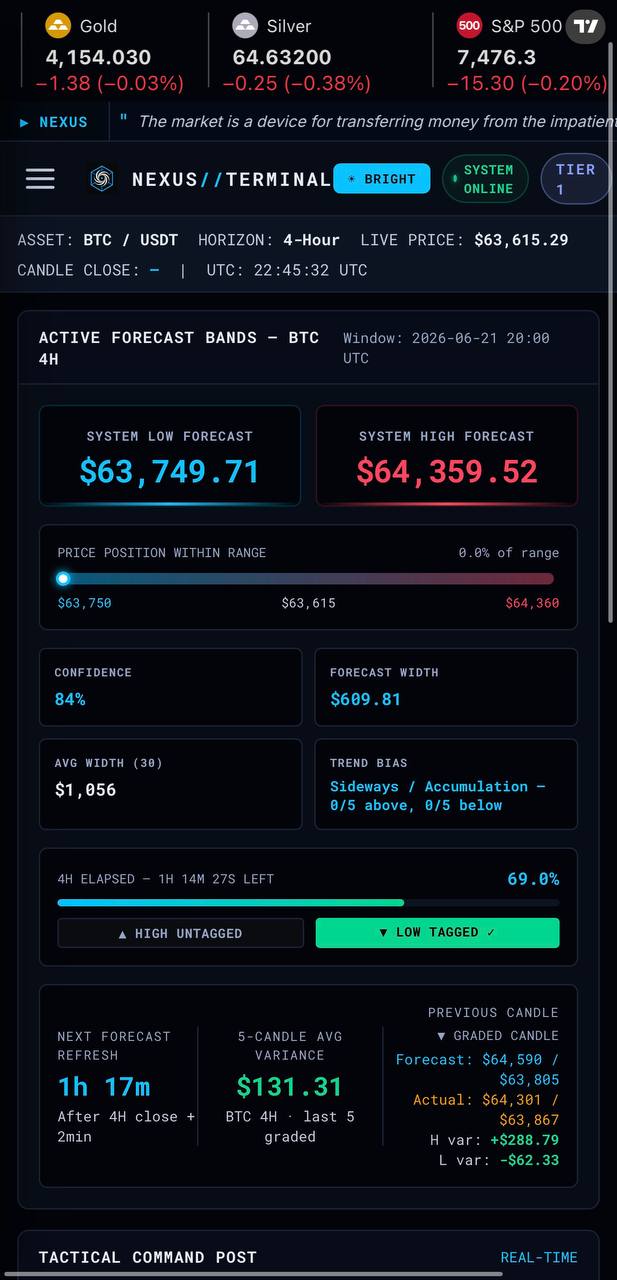
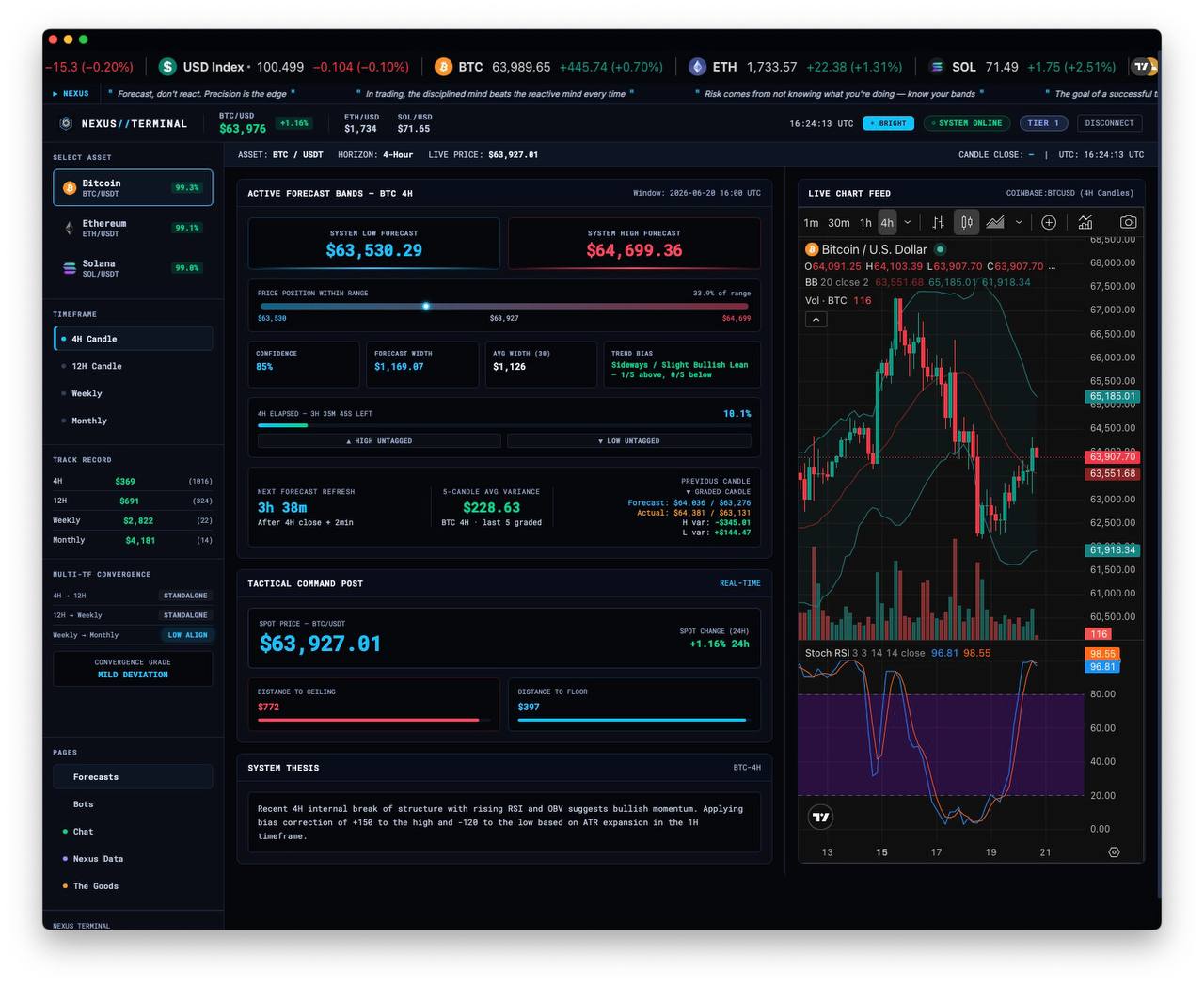
The real terminal, on desktop and mobile.

These are real screenshots from the Nexus experience. The desktop app is the main view. The phone view keeps the same signal in a compact layout.

Nexus desktop terminal view
Desktop terminal · main product view — forecast bands, chart, and graded output in one screen
Nexus mobile terminal view
Mobile terminal · same signal, compact for phone
API + access

Terminal, API, and future assets.

The desktop app is the premium view. Mobile stays clean and scrollable. Forecasts are also available through the API, and the asset list is expanding as the launch finishes up.

BTC · ETH · SOL · Gold · QQQ · S&P
How to read it

Everything is in the output, and the terminal shows it clearly.

The screenshots above are the product preview. This section explains the core pieces so you know what you're looking at when a forecast lands.

ACTIVE FORECAST BANDS — BTC 4H Window: 2026-05-04 20:00 UTC

1 Asset and candle

Shows which asset and timeframe this forecast targets, plus the exact candle it was built for.

The key detail is the Window line — it proves the forecast was created before that candle opened.

Trend Bias: Sideways / Accumulation Confidence: 88

2 Bias and confidence

Trend Bias is the structural read — sideways, bullish, bearish, accumulation, distribution, and so on.

Confidence tells you how strongly the structure lines up across the indicators and recent performance.

System High Forecast: $80,850 System Low Forecast: $79,450 Forecast Width: $1,400

3 Forecast range

The System High and System Low forecasts define the expected candle range.

Forecast Width is the width of the band. Wider means more volatility. Tighter means compression.

System Thesis 4H trend remains bullish with price above rising EMAs and ADX ~31…

4 Structural thesis

This is the plain-English read of why the band looks the way it does — trend, momentum, and key levels.

Previous Candle — Graded (2026-05-04T16:00:00) High Error: +$289.94 | Low Error: -$165.17 Forecast high: $81,050 | Actual high: $80,760.06 Forecast low: $79,450 | Actual low: $79,615.17

5 Accountability layer

The prior candle's forecast is graded against the actual candle that closed.

That way every new forecast lands with context, not just numbers.

Two ways to receive

Terminal first. API when you need it.

Every paid tier includes the hosted terminal. Tier 2 and Tier 3 also unlock the API feed for builders who want Nexus output inside their own workflow.

Included in every tier

Nexus Terminal

Interactive desktop web app. Multi-asset dashboard, live charts, candle progress tracking, forecast history, system thesis, and graded track record. All in one place.

Preview the Terminal
Tier 2 and above

API feed

Real-time JSON over REST. Authenticate with your API key, request forecasts for any asset and timeframe. Build your own bots, dashboards, or analysis tools around the signal.

/api/signal?asset=BTC&tf=4H
User guide

How to use what you receive.

You've seen the output. Here's how to calibrate against recent precision, handle weekends, and fit Nexus into a real trading process.

Calibration: Forecast Width & Rolling MAE

The forecast band

System High Forecast / System Low Forecast — The projected range for the candle. These are the levels to watch: does price stay inside the band, break above, or break below?

Forecast Width — The band size for the candle in front of you. Tells you how much volatility the system expects right now.

Avg Width — The average band width over the recent window. If the current forecast width is well below the average, the system expects compression; well above it, expansion. Live BTC 4H average width is loading….

📐 How to use this

Compare Forecast Width against Avg Width. A much wider band than usual means the system sees something — higher conviction levels, sharper moves expected. A tight projection in a normally volatile window is a flag to watch closer.

Rolling MAE

A moving snapshot of recent precision — the average miss between the forecast bounds and the candle's actual high and low. Live BTC 4H figures right now: loading… across the last 5 graded candles, and loading… across the 30-candle window the Terminal tracks per timeframe.

🧠 The reality check

Rolling MAE is your calibration tool. When MAE is small relative to the band width, the system has been landing tight. If MAE has been swelling, give the edges more respect. Judge every new forecast in the context of the current precision regime — the numbers to do it are always on screen.

Weekend vs weekday

Weekend candles behave differently. Lower volume, wider spreads, less noise but also less conviction. This is one of the most common sources of surprise for new subscribers.

What you'll notice: Weekend forecasts often show tighter projected widths and more neutral bias. The system isn't guessing less — the underlying structure is genuinely flatter.

⚠️ The weekend trap

A weekend range that looks "safe" can get violated immediately when Monday volume returns. Sunday night into Monday morning is the most common transition period for a forecast to get caught offsides.

How to adjust

  • Give weekend forecasts more breathing room on the edges — expect wider actuals than the projection suggests.
  • Monday opens often test or break the weekend range — pay extra attention to Sunday night / Monday morning forecasts.
  • If you see a post-weekend forecast with wider-than-average projected width, that's the system accounting for the volatility re-entry — take it seriously.
How to use this in practice

Nexus is a range forecaster, not a buy/sell signal. Here's how it fits into real trading:

Set expectations before the candle opens

You know the projected high and low before price moves. You can plan entries, exits, and invalidation levels in advance instead of reacting.

Watch the edges

The high and low targets are the levels that matter. If price approaches the high target and the bias is bullish, you have context for a potential breakout. If it approaches with bearish bias, the top of the range becomes resistance. Same logic for the low target with inverted bias.

Check the Rolling MAE

Rolling MAE tells you exactly how far the bands have been missing lately, in dollars. Know the recent precision before acting on any single forecast — the Terminal shows it per asset and per timeframe, updated with every graded candle.

Use the thesis as confluence

The thesis gives you the structural story. If it aligns with your own read, that's confirmation. If it contradicts, that's a flag to look closer. You don't have to agree with it — but you should know what it's seeing.

Don't trade every forecast

The best users of Nexus are selective. High-confidence forecasts where the thesis matches their own read are the ones to plan around. Low-confidence or uncertain-bias forecasts are a signal to sit out. The system tells you when it's less sure — listen to that.

How the track record works

Every forecast is graded the same way. Each closed candle produces a graded receipt: PERFECT HIT (both sides landed well inside tolerance), IN MAE RANGE (misses within the published threshold), ONE-SIDE BREACH (one side exceeded it), or MISS.

Alongside the grade, every miss is measured in dollars — High Error, Low Error, and candle MAE — and rolled into the 30-candle Rolling MAE you see in the Terminal and on the public track record.

This is a deliberately transparent standard. Most "forecast" products hide their misses. Nexus publishes every error in dollars, live, for every market — the receipts are the product.

The track record on the site updates automatically: all-time, 90-day rolling, and 30-day rolling. Every forecast gets graded. No snapshots, no cherry-picked periods.

Common questions

What if a forecast misses?

Forecasts will miss. No system is perfect. The question is whether the misses are informative — whether you can see why a forecast missed and adjust accordingly. The Rolling MAE is designed exactly for this: it gives you the context to evaluate the next forecast in light of recent patterns.

Can I combine this with my own analysis?

Yes — that's the intended use. Nexus gives you a structured, accountable range forecast. Your job is to use it alongside your risk management, entry rules, and market judgment. The thesis tells you the system's reasoning. The Rolling MAE tells you its recent precision. You bring the strategy.

How often do forecasts update?

Every candle close for your subscribed timeframes. 4H = every 4 hours. 12H = twice daily. Weekly = once per week. Monthly = once per month. Each arrives in your Nexus Terminal automatically, with optional push alerts on desktop and mobile.

Who should NOT use this?

If you want entry signals, take-profit targets, or someone to tell you when to buy and sell, Nexus is not that product. It's a range forecaster. It tells you where price is likely to trade, not what to do about it. That's intentional — your strategy is yours.

The system delivers structured, accountable forecasts before every candle. You bring your strategy, your risk management, and your judgment. Nexus brings a clear, consistent read of what's coming next.

Multiple assets. Four timeframes each. Same structured format every time.

Crypto, indices, equities, and metals — same structured output across 4H, 12H, weekly, and monthly. Auto-delivered after every candle close. Viewable in your Nexus Terminal or pulled via API.

Subscribe — from $100/mo

Nexus Terminal credentials and Paper Bot Lab access are delivered immediately. Tier 2 adds API credentials and the Bot Guide PDF; Tier 3 adds exchange-connected live bot control, BYO AI, and the control-system download.

Questions? Email us at support@nexusforecaster.com